As an Ommnio user, you should know that you can edit and delete your own messages:
- Text messages can be edited and deleted.
- Files (images, videos, audio, etc.) can only be deleted.
When you do so, the message will be marked as “edited” or will display “message deleted” so that readers know what happened. This feature is available starting from version 2.7.3, so make sure you have the latest version installed (Android / iPhone).
If you’d like to know more about what users with an admin role can do, you can check the Rules for editing and deleting messages in Ommnio.
On mobile
-
Tap on the message you want to edit or delete (by default you will only have permissions with your own messages, unless you are an Administrator). The following options will appear:
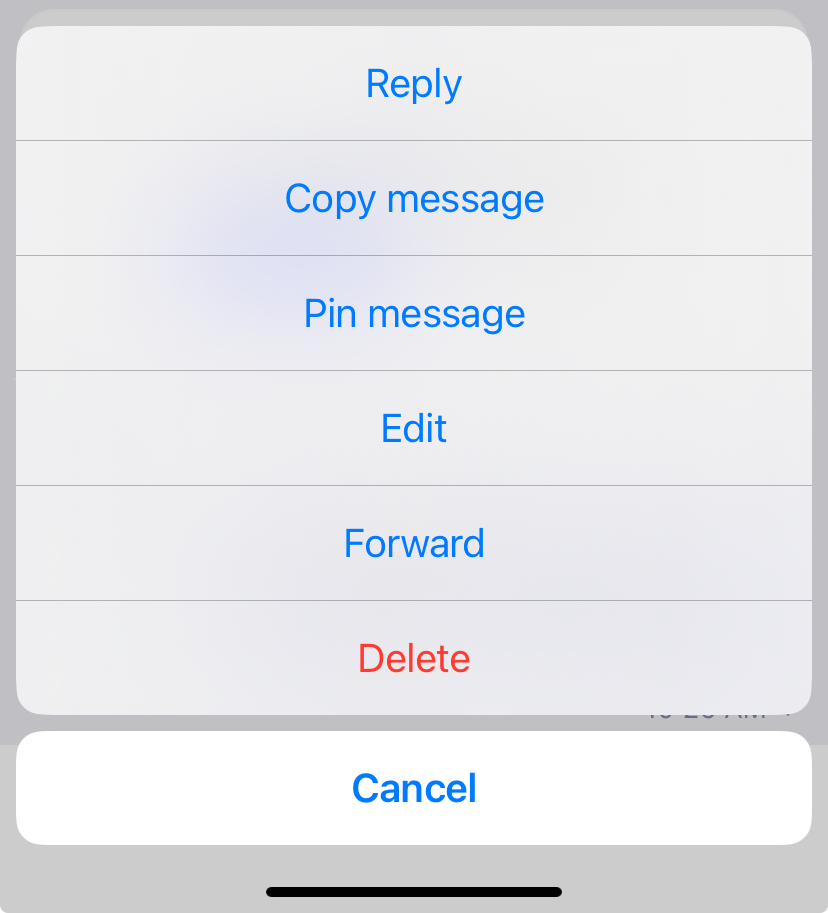
- If you tap "Reply" you will be able to send a message that refers to this same message.
- If you tap "Copy message" you can later "Paste" the text where you need it.
- If you tap "Pin message" you can make the message pinned for all member users at the top of the chat. Check how pinned messages work in this article.
- If you tap "Edit" the message will be opened in the text box and you can modify it. Press the send button again. The rest of the members will see the edited message in real time.
- If you tap "Forward" you can send the same message to another group or person directly without having to write it again.
- Tap "Delete" to completely remove the message.
On web
- Hover over the message and click on the small arrow that you will see in the top right margin of the message bubble. You will see this menu unfold if you have permissions to edit or delete that message (check it here)
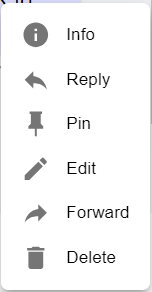
- On web you can see who has read that specific message by clicking on "Info"
🔴 IMPORTANT: The messages you write and send are delivered to users' mobile devices with mobile notifications. So, even if you correct a message afterwards, the notifications will have been sent with the first version of the text. However, when the user taps on the notification and reaches the chat group, they will see the updated information with your corrections.